Build An AI Analytics Operating System By Asking The Agent To Build It

Mykhaylo
04 July 2026
17 min read
You do not need to design this system upfront. You can build it by asking Codex, Claude Code, or Cursor to connect one layer at a time: inspect existing analytics, write the tracking plan, add standard properties, connect billing, generate acquisition reports, and schedule recurring analysis. The result is not another dashboard. It is a repeatable operating workflow over the tools your business already uses.
The Problem: The Tools Do Not Explain Each Other
The problem this solves is not lack of data. Most teams already have product analytics, billing data, ad reports, platform consoles, issue trackers, and internal notes. The problem is that these systems do not explain each other. Product analytics can show usage without revenue context. Billing can show revenue without product behavior. Ad platforms can show spend without downstream quality. Store and admin consoles can contain operational blockers that never appear in a dashboard. The AI harness gives the team one workflow that can read across those systems and produce a structured answer.
What I Mean By AI Harness
By “AI harness”, I mean the working environment around the model: local repo access, command execution, API connectors, MCP tools, local scripts, persistent notes, and scheduled automations. The model is only one part of the system. The harness is what lets it inspect code, run a report script, query analytics, read a product context file, compare the current result to previous runs, and write a brief back into the team’s workspace.
This does not replace the underlying tools. The analytics tool still stores product behavior. The billing tool still stores revenue. The ad platform still stores spend and campaign delivery. The store or admin console still stores operational state. The repo still stores implementation details and product context. The AI workflow sits above those systems and uses them together.
The System Shape
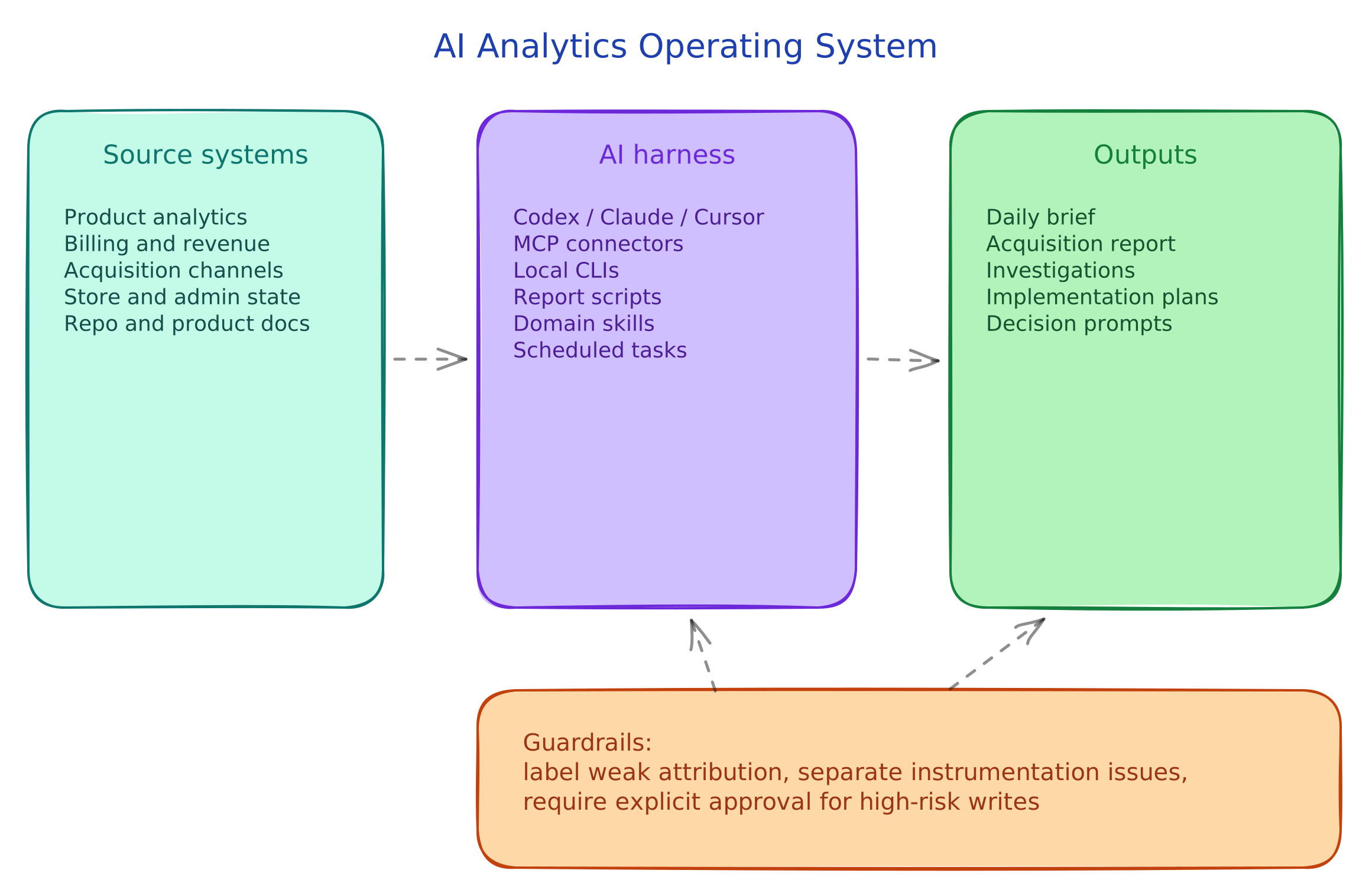
The minimal architecture has five layers:
- Product instrumentation: the events and properties emitted by the app, website, backend, or product.
- Source systems: analytics, billing, acquisition, store/admin data, issue trackers, docs, and code.
- Access layer: MCP connectors, local CLIs, API scripts, exports, and generated reports.
- Agent workflow: prompts, skills, memory, scheduled tasks, and approval rules.
- Outputs: daily briefs, investigations, structured notes, report drafts, implementation plans, and safe operator actions.
How This Actually Happened For Me
For me, this did not start as an analytics project. I am a solo developer, not an analyst, marketer, or growth person. My knowledge of marketing, analytics, funnels, attribution, and paid acquisition was limited, and a lot of it still is. Before this setup, I mostly had vague assumptions about what was happening in my products: which users were activating, which paywall moments mattered, whether ads were bringing good users, whether a spike was real or just noise. I could open dashboards, but opening dashboards is not the same as understanding the product.
The setup built itself over time because I kept asking the agent to solve the next concrete problem. First it inspected the app. Then it helped define the events. Then it connected analytics. Then it cross-checked revenue. Then it generated acquisition reports. Then it scheduled daily analysis. None of those steps was the final system. Each one made the next step obvious.
The biggest change was not just having more data. It was having something that could read the data with me. I was learning while operating: part developer, part “vibe marketer”, part person trying to stop guessing. The agent does not make the data perfect, and it is not always right, but it gives me a second pass from several useful angles: product analytics, monetization, acquisition, instrumentation, and copy all in the same conversation. Before, I had scattered evidence and guesses. After, I had data plus an interpreter that could challenge the obvious reading.
This is still not the final shape. It evolves. Some attribution is incomplete. Some reports are too noisy until the prompt is tightened. Some integrations fail and need fallback paths. But it works well enough to change how I operate: I understand my products faster, I see instrumentation gaps earlier, and I make fewer decisions from vague intuition alone.
Step 1: Give The Agent Product Context
Start with product context. Before the agent can interpret a metric, it needs to know what the product is trying to do. Ask it to create a short product context file in the repo:
Create .agents/product-marketing-context.md for this product.

Inspect the repo first. Then write:
- what the product does
- who it serves
- the core promise
- the activation moment
- the retention loop
- the monetization model
- the current strategic questions
- privacy boundaries for analytics and reports
- the vocabulary the team uses
This file prevents generic analysis. A high app-open count, signup count, or dashboard view count means different things depending on the product. The agent needs the product model before it can decide whether a metric is useful, suspicious, or irrelevant.
Step 2: Turn Product Questions Into Events
Next, ask the agent to inspect the product and write a tracking plan. The goal is not to track everything. The goal is to track the decisions the team needs to make.
Inspect the product flows and current analytics implementation.

Create a tracking plan with:
- key business questions
- event names
- trigger points
- required properties
- standard properties included on every important event
- events that should not exist because they would be noisy
- data that must never be sent because it is sensitive or user-entered

Keep the event list small. Focus on onboarding, activation, repeated usage, monetization, retention proxies, referrals or reviews, and failure states.
The agent should produce boring event names: signup_completed, workspace_created, activation_completed, paywall_viewed, subscription_started, purchase_failed. Context belongs in properties, not in clever event names.
Standard properties matter as much as the events. If important events include plan, country, platform, app_version, days_since_signup, acquisition_source, and billing_status_known, the agent can later explain segments. Without those properties, it can mostly count.
Step 3: Connect The Source Systems
After that, connect the source systems. You do not need the exact tools below. You need each role covered by something the agent can read.
| Role | What it explains | Common tools |
|---|---|---|
| Product analytics | What users did, where they dropped, which segments behaved differently | PostHog, Amplitude, Mixpanel, Heap, GA4, warehouse event tables |
| Revenue or billing | Who paid, who cancelled, which plan moved, whether failures were technical | Stripe, RevenueCat, Chargebee, Paddle, Shopify, internal billing |
| Acquisition | Where users came from, what spend produced, whether traffic had downstream quality | Google Ads, Meta Ads, Apple Search Ads, LinkedIn Ads, Search Console, AppsFlyer, Adjust |
| Store or platform state | What version, product, price, metadata, or availability is live | App Store Connect, Google Play Console, Stripe catalog, Shopify admin, internal admin |
| Work and release context | What changed in code, issues, PRs, releases, or docs | GitHub, Linear, Jira, Notion, local repo files |
Ask the agent to inspect available connectors and CLIs:
Inspect this environment and list which systems you can access for analytics, billing, acquisition, platform state, repo context, and scheduled tasks.

For each system, show:
- access method
- what data it can read
- whether it can write
- what writes should require explicit approval
- one useful first query or command
This prevents vague integration plans. The agent should tell you exactly what it can access: an MCP connector, a CLI, an API script, a local report, an export file, or nothing yet.
Step 4: Use Scripts When Connectors Are Not Enough
When a connector is not enough, ask the agent to create a local script. This is often the simplest way to make an awkward API useful. The script can handle authentication, pagination, API-specific response formats, historical snapshots, and HTML or Markdown output. The agent can then run the script and interpret the result.
Create a local report script for acquisition data.

It should:
- read credentials from an env file
- fetch yesterday's campaign performance
- update data/history.json
- write reports/YYYY-MM-DD.html
- update reports/latest.html
- include operational warnings such as paused campaigns, blocked payments, missing spend, or zero conversion

After creating it, run it once and verify the output files exist.
Use scripts for retrieval and normalization. Use the agent for interpretation. That separation keeps the workflow easier to debug: if the numbers are wrong, inspect the script; if the recommendation is weak, inspect the prompt.
Step 5: Write A Manual Brief Before Scheduling It
The first user-facing output should be a daily brief. This is where the connected systems become useful. The brief should compare a recent period to a baseline, cross-check behavior against revenue, include acquisition quality when available, and separate product conclusions from instrumentation issues.
Create a concise strategic growth brief.

Use the last completed day and compare it to the trailing 7-day baseline.

Lead with decision-useful conclusions.

Cover:
- active users
- onboarding
- activation
- first key action
- repeated key action
- billing or paywall behavior
- purchase starts, cancellations, failures, and successes
- acquisition source, country, campaign, or channel
- review, referral, invite, or share events if relevant
- instrumentation issues

Use revenue data to cross-check behavioral conclusions.
Use acquisition data to identify channel, country, campaign, or keyword opportunities.
Do not recommend action from one noisy metric.
Separate product conclusions from instrumentation problems.
End with concrete inspections, tests, or next actions.
The key requirement is not length or tone. The key requirement is that the brief changes what the team does next.
Step 6: Turn Useful Workflows Into Scheduled Loops
Once a manual brief is useful, schedule it. Most users do not realize agent harnesses can run recurring jobs. In Codex, that may be an automation. In another environment, it may be a cron job, CI workflow, scheduled cloud function, or built-in task runner. The important part is that the agent can wake up, gather context, run tools, and write the output without someone opening a chat first.
Ask the agent to inspect the scheduling options:
Inspect what scheduled-task or automation system is available in this environment.

I want a recurring analytics brief.
Show me:
- what scheduling mechanism you can use
- where the job configuration will live
- what command or prompt will run
- what context it will read
- where it will write the output
- how I can pause, edit, or delete it
Then ask it to create the first loop:
Create a scheduled daily growth brief at 09:00.

Each run should:
- query the last completed day
- compare it to the trailing 7-day baseline
- read the product context file first
- use product analytics, billing, acquisition, and platform data when available
- separate product conclusions from instrumentation problems
- lead with the most decision-useful findings
- end with concrete inspections or tests

Keep the output short enough to read in two minutes.
Scheduled loops are useful for work that repeats with the same shape:
- daily growth brief
- daily acquisition report
- weekly monetization review
- weekly retention review
- weekly instrumentation audit
- release impact review
- PR or issue queue review
Run the loop for a few days, then ask the agent to revise the prompt. The first version will usually be too broad, too verbose, or too focused on raw metric movement. Tighten it by telling the agent which sections were useful, which were noise, and which decisions the report failed to support.
Step 7: Make Attribution Explicit
If acquisition data is part of the setup, handle attribution explicitly. Partial attribution is enough for directional questions, but it is not enough for confident campaign decisions. Country-level spend compared to country-level revenue is not the same thing as user-level campaign attribution.
Ask the agent to document the attribution chain:
Inspect the current attribution setup.

Document:
- how acquisition source is captured
- how campaign, ad group, keyword, creative, or UTM data is stored
- how that data connects to the product user id
- how the product user id connects to the billing customer id
- which events include attribution properties
- which reports are only directional because attribution is incomplete
- what implementation is needed to close the gap
For SaaS, the chain might be:
UTM parameters -> signup -> workspace -> billing customer -> paid conversionFor mobile, the chain might be:
ad platform -> attribution provider or platform token -> app user id -> subscription customer id -> analytics user idThe brief should label weak attribution as weak. It is fine for the agent to say “this looks promising, but the attribution is not strong enough to reallocate budget yet.” That is better than a confident recommendation built on mismatched data.
Step 8: Add Approval Rules For Writes
Finally, define write safety before giving the agent operational access. Reading data is different from changing the business. Price changes, subscription edits, app availability, release submission, ad budgets, bids, campaign status, billing products, and customer communications should require explicit approval.
Add the rule directly to the project instructions:
Before any high-risk write, show:
- target resource
- current state if relevant
- exact command or JSON payload
- expected effect
- rollback or mitigation plan

Wait for explicit approval before executing.
This lets the agent prepare operational work without silently mutating systems that affect customers, revenue, or acquisition spend.
The Actual Source Stack
The real source stack matters. This setup was not only a generic model prompt. It used concrete skills, connectors, APIs, and local tools that gave the agent better operating knowledge.
There are two categories here:
- Official or vendor-backed systems that expose real data and operations.
- Local skills that teach the agent how to work with that data.
The public sources behind the main pieces are:
- PostHog MCP for letting MCP-compatible agents work with PostHog data, plus the PostHog Skills Store for PostHog-specific agent skills. In this setup, that maps to skills for querying product data, investigating metrics, diagnosing missing recordings, instrumenting analytics, checking feature flags, exploring sessions, and building PostHog workflows.
- RevenueCat MCP for connecting AI assistants to RevenueCat operations, and RevenueCat’s AI Toolkit for the broader idea of using MCP and skills to inspect and operate subscription products. In this setup, that maps to revenue metrics, chart data, purchases, subscriptions, product store state, offerings, entitlements, and product operations.
- Apple Ads Campaign Management API and Apple Ads reporting docs for campaign, ad group, keyword, and report data. In this setup, that maps to Apple Search Ads campaign reports, ad group reports, keyword reports, campaign management, keyword management, and app search.
- App Store Connect API for automating App Store Connect workflows such as apps, versions, subscriptions, pricing, availability, metadata, sales, trends, and analytics reports. In this setup, that access is wrapped through the
appstore-connectskill and a localascCLI. - Codex automations for recurring background tasks, scheduled briefs, and report loops that combine prompts, tools, and skills.
The other layer was not data access. It was operating knowledge. I used local marketing, analytics, and product skills as playbooks for the agent: analytics-tracking for event design, paid-ads for campaign thinking, paywall-upgrade-cro for upgrade moments, onboarding-cro for activation, page-cro for conversion pages, pricing-strategy for monetization questions, churn-prevention for cancellation and retention, and growth-loops for product-led growth mechanics.
Some of those skills came from or closely resemble public skill repos such as LeoYeAI/openclaw-marketing-skills, coreyhaines31/marketingskills, and phuryn/pm-skills. The exact local install matters less than the pattern: give the agent domain-specific instructions, not just raw tool access.
Writing skills such as copywriting and marketing-psychology added another layer. They helped turn product behavior into better questions, clearer positioning, and report language that was easier to act on.
This distinction matters. PostHog, RevenueCat, Apple Ads, and App Store Connect are data and operation sources. The local skills are the agent’s working instructions in my setup: how to ask better questions, how to structure the brief, how to inspect anomalies, how to avoid unsafe writes, and how to turn the result into something readable.
The exact list will differ by team. The useful pattern is to give the agent both data access and domain-specific operating skills. A raw model can summarize a table. A harness with PostHog access, billing access, acquisition access, product context, and relevant skills can explain what the table probably means and what to inspect next.
A Concrete Example: Keyword And Spend Optimization
One real use case was Apple Search Ads keyword optimization. I did not start with a polished dashboard or a fixed campaign playbook. I asked the agent to inspect the acquisition setup and use the available tools to find where spend was inefficient.
The workflow looked like this:
- Use the Apple Search Ads tools to identify the locales where campaigns were running.
- Use the Astro MCP server, the keyword research source in my setup, to scan high-performing keywords by locale.
- Compare keyword performance against the live Apple Search Ads campaign structure.
- Identify keywords that deserved more budget, keywords that were wasting spend, and campaign or ad group changes that would make the structure cleaner.
- Ask the agent to prepare the campaign changes: budget movement, keyword additions, keyword removals, and bid adjustments.
- Review the proposed changes before execution, because this is a high-risk write path.
- Measure the result after the changes landed.
That workflow produced a real optimization: around a ~40% reduction in CPA, or cost per tap. The important part is not that this exact number will repeat for every product. The important part is that the agent was able to connect three layers that are usually handled separately: keyword research, live campaign structure, and spend performance.
This is the kind of workflow that is hard to imagine at the beginning. If you only think of the agent as a code generator, you ask it to write code. If you connect it to the operating layers of the business, you can ask it to inspect, compare, propose, and maintain workflows that affect acquisition, revenue, and product decisions.
Minimum Useful Version
The minimum useful version is smaller than it sounds:
- Product context file.
- Small event taxonomy.
- Standard properties on important events.
- Product analytics access.
- Revenue or billing access.
- One manual daily brief.
- One scheduled daily brief.
- A separate instrumentation section in the brief.
- Approval rules for high-risk writes.
Add acquisition, store APIs, local reports, attribution cleanup, and deeper weekly reviews after that. Do not start by building the whole thing. Start by asking the agent to inspect what exists, then connect one missing layer at a time.
The Bar For Done
The setup is working when the brief can compare a recent period to a baseline, explain what changed, cross-check behavior with revenue, identify missing instrumentation, and propose a concrete next action. If it only summarizes charts, it is not finished. If it cannot tell product reality from tracking failure, it is not finished. If it does not help the team decide what to inspect or change next, it is not finished.
Final Thought
Agents are still mostly discussed as developer tools: generate code, fix bugs, write tests, open pull requests. That is useful, but it is a narrow view of what they can do.
The more interesting use case is operational leverage. If an agent can read your product data, revenue data, acquisition data, store data, notes, and local context, it can help you build workflows that did not exist before. It can inspect the current setup, find the missing layer, write the first script, create the first report, turn the useful version into a scheduled loop, and keep improving the workflow as the product changes.
At the beginning, it may not be obvious what to build. That is normal. The practical way in is to experiment with the agent long enough for the useful workflows to reveal themselves. Ask it to inspect what exists. Ask it what is missing. Ask it to create the smallest useful report. Ask it to run the report again tomorrow. After enough iteration, the agent is no longer just producing code. It is helping build the operating system around the product.
That is the part I think small teams should pay attention to. Not because the setup is perfect, and not because the agent is always right. Because even an imperfect version can give a small team better visibility, better questions, and better operating rhythm than disconnected dashboards and occasional manual analysis.